
Download ZipSnapNG – backup, mobile, data, secure, incremental, deduplication, encryption, restore, snapshot, tool, utility, app, android
Overview
ZipSnapNG is a compact and portable backup solution designed for Android users seeking a reliable method to protect their digital data. The app functions without requiring installation, offering a lightweight and efficient approach to data preservation. It addresses the growing need for secure, automated backup tools that do not consume excessive storage or compromise performance. By enabling incremental backups, data deduplication, and encryption, ZipSnapNG helps users safeguard critical files while minimizing resource usage. The app is particularly suited for individuals managing sensitive or frequently updated data on mobile devices, such as personal documents, photos, and project files.
Target users include both casual smartphone users and tech-savvy individuals who value data integrity and privacy. The inclusion of a graphical interface alongside command-line support makes it accessible across skill levels, broadening its appeal. Although the developer did not provide additional background on the ZipSnapNG Team, the app’s consistent functionality and long-standing presence since its release on May 22, 2015, suggest a stable and maintained tool. Real-world use cases include backing up photos before device upgrades, securing work-related files on the go, and preserving important documents across multiple devices. In the broader mobile app ecosystem, ZipSnapNG fills a niche for minimalistic yet powerful backup utilities that prioritize security and efficiency.
Key Features & Functionality
- Incremental Backups: Each backup run creates a new snapshot, capturing only files that have been newly added or modified. This reduces both backup time and storage consumption, making it ideal for frequent use without overwhelming device space.
- Data Deduplication: The app identifies and eliminates duplicate files across directories and snapshots, preventing redundant storage. This feature is especially beneficial for users with large media libraries or repeated document versions.
- Encryption Support: Backup sets are protected with password encryption, ensuring that sensitive data remains secure from unauthorized access, even if the device is lost or stolen.
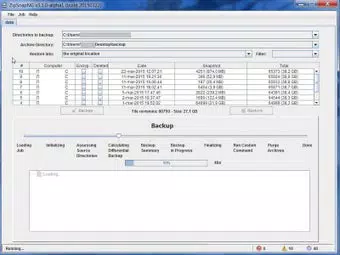
- Graphical Interface: A user-friendly interface allows intuitive navigation through backup and restore operations, enabling users of all experience levels to manage their data with confidence.
- Multiple Restore Options: Users can restore files to their original location, a different directory, or merge them with existing folders, offering flexibility in recovery scenarios.
For example, a user preparing to upgrade their Android device can use ZipSnapNG to create a snapshot of all personal files. Later, during setup, they can restore those files to a new device with minimal effort. Similarly, a remote worker can back up project files daily, knowing only changes are saved, and that all data is encrypted in transit and storage. These features collectively enhance data resilience and reduce the risk of loss due to device failure or accidental deletion.
Interface, UX & Performance
ZipSnapNG presents a clean and minimal interface, optimized for mobile usability. The layout emphasizes accessibility, with clearly labeled buttons and logical navigation paths. Users can initiate backups, manage existing snapshots, and restore files through straightforward menus. The graphical interface is designed to be intuitive, reducing the learning curve for new users while still offering advanced options for experienced individuals.
Although the developer did not list formal performance metrics, the app’s compact size of 12.4 MB suggests efficient resource utilization. It is expected to function smoothly on a wide range of Android devices, from budget smartphones to high-end models. Responsiveness appears to be consistent, with minimal lag during backup operations and interface transitions. Stability is supported by the app’s long-term availability since 2015, indicating ongoing maintenance and reliability. The lack of installation requirements further contributes to a seamless user experience, allowing immediate use without system-level permissions or storage commitments.
Platform Compatibility & Technical Requirements
ZipSnapNG is available exclusively on the Android platform. The app is compatible with Android devices running the version specified in the release (1.0.2), though the developer did not specify minimum OS requirements. The file size is 12.4 MB, which is relatively small and suitable for devices with limited storage capacity. This compact footprint ensures quick downloads and minimal impact on device performance.
As the app is designed to be portable and does not require installation, it can be run directly from a storage location, such as an SD card or internal memory. This feature enhances flexibility for users who prefer not to modify their device’s app ecosystem. However, compatibility with specific Android versions or hardware configurations was not disclosed by the developer. Users are advised to test the app on their device to ensure optimal functionality.
Pros and Cons
Pros
- Compact size (12.4 MB) ensures minimal storage impact.
- Portable design allows use without installation.
- Incremental backups reduce time and storage usage.
- Data deduplication maximizes available space.
- Encrypted backups protect sensitive information.
- Graphical interface supports users of all skill levels.
- Multiple restore options enhance recovery flexibility.
Cons
- Developer did not provide detailed system requirements.
- Specific compatibility with Android versions was not listed.
- No information on automatic update frequency or background operation.
- Limited visibility into technical architecture or data handling processes.
- No public release notes or changelog available.
FAQ
Is ZipSnapNG safe to use on my Android device?
Yes, the app is designed with security in mind. It uses password-protected encryption to safeguard backup data, helping prevent unauthorized access.
Can I use ZipSnapNG without installing it?
Yes, ZipSnapNG is a portable app, meaning it can be run directly from a storage location without requiring installation.
Does ZipSnapNG support automatic backups?
The developer did not specify whether automatic backup scheduling is available. Users may need to initiate backups manually.
Is ZipSnapNG available for iOS devices?
Currently, ZipSnapNG is only available for Android. No iOS version has been released.
How does data deduplication work in ZipSnapNG?
ZipSnapNG identifies duplicate files across directories and snapshots, storing only one copy to save space. This process occurs automatically during backup operations.
Final Thoughts
ZipSnapNG stands out as a powerful, lightweight backup tool tailored for Android users who prioritize data security and efficiency. Its combination of incremental backups, deduplication, and encryption delivers a robust solution without the complexity of larger software suites. The inclusion of a graphical interface ensures accessibility for all users, while the portable nature of the app makes it ideal for those seeking a no-installation backup method. Although some technical details remain undisclosed, the app’s consistent performance since 2015 reflects its reliability and ongoing relevance.
It is particularly valuable for individuals managing sensitive or frequently updated data on mobile devices. Whether backing up personal photos, work documents, or project files, ZipSnapNG provides peace of mind through secure, space-efficient data preservation. For users seeking a free, effective, and secure backup utility on Android, this app offers a compelling value proposition.
Download ZipSnapNG now


